Security teams today face thousands of alerts every day. While many of these alerts are harmless, every one demands attention, making it difficult for analysts to identify and respond to genuine threats quickly. This overwhelming alert volume often leads to alert fatigue, slower response times, and increased security risks.
This is where SOAR (Security Orchestration, Automation and Response) transforms modern security operations.
Instead of relying on manual investigations and repetitive workflows, SOAR enables organizations to connect security tools, automate routine tasks, and orchestrate coordinated responses across their entire security ecosystem. The result is faster incident response, improved analyst productivity, and stronger cyber resilience.
In this guide, you’ll learn:
- What SOAR is
- SOAR full form
- How SOAR security works
- The core components of a SOAR platform
- A real-world phishing response workflow
- Why organizations are adopting SOAR in cyber security
See how CyberSIO helps strengthen your security posture: Schedule a Free Demo.
What Is SOAR (Security Orchestration, Automation and Response)?
Quick Definition (Featured Snippet)
SOAR (Security Orchestration, Automation and Response) is a cybersecurity technology that integrates security tools, automates repetitive security operations, and standardizes incident response through predefined workflows known as playbooks. It enables Security Operations Centers (SOCs) to detect, investigate, and respond to threats faster while reducing manual effort.
1. Security Orchestration
Orchestration connects multiple security solutions into one coordinated workflow.
Instead of analysts manually switching between dozens of security tools, orchestration enables these tools to communicate automatically.
Examples include integrating:
- SIEM platforms
- EDR solutions
- Firewalls
- Threat intelligence feeds
- Identity and Access Management (IAM)
- Ticketing systems
- Email security gateways
- Cloud security tools
This centralized coordination significantly reduces manual effort while improving operational efficiency.
2. Security Automation
Security analysts spend much of their time performing repetitive tasks.
Automation eliminates these repetitive activities by executing predefined workflows automatically.
Common SOAR automation tasks include:
- Collecting threat intelligence
- Enriching alerts
- Blocking malicious IP addresses
- Isolating compromised endpoints
- Creating incident tickets
- Running malware analysis
- Sending notifications
- Gathering forensic evidence
By automating routine investigations, analysts can focus on high-priority security incidents.
3. Incident Response
Response is the final stage where security actions are executed based on predefined playbooks.
Instead of every analyst following different procedures, SOAR ensures every incident follows a consistent, documented workflow.
Typical response actions include:
- Containing infected devices
- Resetting compromised accounts
- Blocking malicious domains
- Quarantining emails
- Escalating incidents
- Recording evidence for compliance
This consistency improves both response speed and audit readiness.
Also read: Patch Management Software: The Complete Enterprise Guide for 2026
Why Is SOAR Important?
Organizations today use dozens of security products.
Without orchestration, analysts must manually investigate alerts across multiple platforms.
A SOAR platform brings everything together by:
- Connecting security technologies
- Automating repetitive investigations
- Reducing alert fatigue
- Accelerating incident response
- Improving collaboration
- Standardizing security operations
Rather than replacing security analysts, SOAR helps them work more efficiently by eliminating repetitive manual tasks.
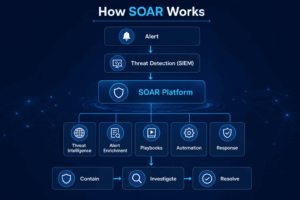
How Does SOAR Actually Work?
Understanding the workflow behind SOAR security helps explain why it has become an essential technology for modern Security Operations Centers.
Instead of treating every security alert manually, SOAR follows a structured workflow that automates investigation while keeping analysts involved for critical decisions.
A typical SOAR platform processes incidents through several stages.
Core Components of a SOAR Platform
Most modern SOAR technologies include four primary components.
1. Workflow Engine
The workflow engine acts as the brain of the platform.
It determines what actions should occur after receiving an alert and executes predefined playbooks accordingly.
2. Security Integrations
SOAR platforms integrate with hundreds of security solutions including:
- SIEM
- EDR
- Firewalls
- Cloud security
- Threat intelligence platforms
- Email security
- IAM systems
- Ticketing platforms
These integrations enable security tools to exchange information automatically.
3. Playbooks
Playbooks are predefined workflows that automate security investigations.
Each playbook contains a sequence of actions for handling a specific threat, such as phishing, ransomware, malware, or unauthorized access attempts.
Instead of relying on individual analyst experience, playbooks ensure consistent responses across the organization.
4. Dashboard and Case Management
Every automated action is documented within a centralized dashboard.
Security teams can:
- Track investigations
- Monitor alerts
- Review evidence
- Measure response time
- Generate compliance reports
- Collaborate across teams
This visibility improves operational efficiency and supports audit requirements.
Step-by-Step SOAR Workflow
Below is a typical security incident handled by a SOAR platform.
Step 1: Alert Generation
A SIEM detects suspicious login behavior from an employee account and sends an alert to the SOAR platform.
Step 2: Automated Alert Enrichment
SOAR automatically gathers additional context from multiple sources.
It collects:
- User identity
- Device information
- Threat intelligence
- Previous incidents
- Geolocation
- Risk score
- Endpoint status
What would normally take an analyst several minutes is completed automatically within seconds.
Step 3: Risk Analysis
The platform evaluates the collected information against predefined policies.
If the alert is determined to be a false positive, the case can be automatically closed.
If the risk is high, the incident proceeds to the response stage.
Step 4: Automated Response
Based on the playbook, SOAR may automatically:
- Disable the compromised account
- Block malicious IP addresses
- Quarantine the endpoint
- Notify the SOC team
- Create an incident ticket
- Launch malware analysis
- Escalate to security leadership
Step 5: Documentation
Every action performed by the platform is recorded.
The final incident report includes:
- Timeline
- Evidence collected
- Automated actions
- Analyst decisions
- Compliance logs
- Final resolution
This documentation simplifies future investigations and regulatory audits.
Worked Example — Phishing Alert
Imagine an employee receives an email that appears to come from the HR department requesting a password reset.
Traditional Manual Investigation
An analyst must:
- Review the email
- Check URLs
- Investigate sender reputation
- Search threat intelligence
- Verify user activity
- Contact the employee
- Block malicious domains
- Remove similar emails
- Update the incident ticket
This process may take 20–40 minutes for a single phishing alert.
Investigation Using SOAR
The phishing playbook begins immediately.
- The email is detected.
- SOAR extracts all URLs and attachments.
- Threat intelligence feeds automatically evaluate the indicators.
- Malicious URLs are blocked.
- The endpoint is scanned.
- Similar emails are quarantined.
- An incident ticket is created.
- Security analysts receive the investigation summary instead of starting from scratch.
The analyst reviews the findings, validates the automated actions, and focuses only on decisions requiring human judgment.
This combination of orchestration, automation, and standardized response demonstrates why SOAR in cybersecurity has become a cornerstone of modern Security Operations Centers.
Also read: PAM Solution: The Complete Guide to Privileged Access Management
SOAR vs. SIEM vs. XDR: What’s the Difference?
Many organizations evaluating SOAR security often confuse it with SIEM or XDR. While these technologies complement each other, they serve different purposes within a Security Operations Center (SOC).
Think of it this way:
- SIEM tells you what happened.
- SOAR determines what to do next.
- XDR provides deeper threat detection and automated protection across multiple security layers.
A mature cybersecurity program often uses all three together to improve visibility, automate response, and reduce the time required to contain cyber threats.
SOAR vs SIEM
A Security Information and Event Management (SIEM) platform collects and analyzes security logs from across an organization’s IT environment. It helps identify suspicious activity by correlating data from multiple sources.
However, SIEM alone does not automatically investigate or remediate incidents. Once an alert is generated, analysts typically perform manual investigations.
This is where SIEM and SOAR work together.
While SIEM detects potential threats, SOAR orchestrates the response by automating investigations, enriching alerts, executing playbooks, and coordinating actions across integrated security tools.
Example
A SIEM detects multiple failed login attempts from different countries.
Without SOAR:
- Analyst reviews logs
- Checks IP reputation
- Verifies user activity
- Contacts the employee
- Blocks malicious IPs
- Updates incident records
With SOAR:
- Threat intelligence is collected automatically
- User identity is verified
- Endpoint status is checked
- Risk score is calculated
- Firewall rules are updated
- Incident ticket is generated
- Analysts receive a fully enriched investigation
The result is significantly faster response with fewer manual tasks.
SOAR vs XDR
Extended Detection and Response (XDR) expands threat detection by correlating telemetry across endpoints, email, cloud workloads, networks, and identity systems.
Unlike SOAR, XDR primarily focuses on improving threat detection and providing built-in response capabilities within its own ecosystem.
SOAR extends beyond detection by orchestrating actions across numerous third-party security solutions, enabling organizations to automate complex workflows regardless of vendor.
For example, XDR may detect ransomware activity on an endpoint, while SOAR can coordinate actions across:
- Firewall
- Identity platform
- Email gateway
- Threat intelligence platform
- Ticketing system
- SIEM
- Endpoint security
- Collaboration tools
This makes SOAR particularly valuable for organizations with diverse security environments.
SIEM vs SOAR vs XDR Comparison Table
| Feature | SIEM | SOAR | XDR |
| Primary Purpose | Detect threats | Automate and orchestrate response | Improve detection across security layers |
| Collects Security Logs | Yes | Integrates with SIEM | Yes |
| Correlates Events | Yes | Uses correlated alerts | Yes |
| Threat Detection | High | Depends on integrated tools | Very High |
| Automated Investigation | Limited | Yes | Partial |
| Automated Response | Limited | Extensive | Built-in Response |
| Playbooks | No | Yes | Limited |
| Multi-Vendor Integrations | Moderate | Extensive | Often Vendor-Centric |
| Case Management | Limited | Yes | Limited |
| Best For | Visibility | Incident Response Automation | Advanced Threat Detection |
SOAR Use Cases: Where It Delivers the Most Value
One of the biggest strengths of SOAR in cyber security is its ability to automate repetitive security operations while ensuring every incident follows a standardized workflow.
Modern organizations use SOAR for far more than phishing investigations. It supports both traditional SOC operations and broader enterprise security processes.
Inside the Security Operations Center (SOC)
1. Phishing Response Automation
Phishing remains one of the most common attack vectors.
Instead of manually investigating every suspicious email, SOAR automatically:
- Extracts URLs and attachments
- Checks threat intelligence feeds
- Sandboxes suspicious files
- Quarantines malicious emails
- Blocks malicious domains
- Creates incident records
- Notifies affected users
This dramatically reduces investigation time and improves consistency.
2. Malware Containment
When malware is detected, rapid containment is essential.
A SOAR playbook can:
- Isolate compromised endpoints
- Block command-and-control servers
- Trigger endpoint scans
- Notify analysts
- Preserve forensic evidence
- Generate compliance reports
3. Vulnerability Management
SOAR streamlines vulnerability response by:
- Prioritizing vulnerabilities
- Matching CVEs with threat intelligence
- Assigning remediation tasks
- Tracking patch status
- Escalating overdue fixes
4. Threat Intelligence Enrichment
Instead of manually researching indicators of compromise (IOCs), SOAR automatically gathers:
- IP reputation
- Domain intelligence
- Malware hashes
- WHOIS information
- MITRE ATT&CK mappings
- Historical incident data
This provides analysts with richer context before they begin an investigation.
5. Alert Triage
Security teams receive thousands of alerts every day.
SOAR helps reduce alert fatigue by:
- Removing duplicate alerts
- Prioritizing incidents
- Enriching event data
- Identifying false positives
- Routing incidents to the appropriate analysts
Beyond the SOC
SOAR also supports workflows outside traditional security operations.
Insider Threat Investigations
SOAR integrates identity, access, and endpoint data to investigate suspicious employee activity and coordinate response actions.
Employee Offboarding
When an employee leaves the organization, SOAR can automate:
- Account deactivation
- VPN access removal
- Email forwarding updates
- Identity revocation
- Asset recovery notifications
Fraud Detection
Financial institutions use SOAR to coordinate fraud investigations by combining alerts from transaction monitoring systems, identity platforms, and threat intelligence sources.
Cloud Security
SOAR automates cloud security workflows by:
- Identifying exposed resources
- Investigating misconfigurations
- Triggering remediation workflows
- Notifying cloud administrators
Also read: What Is SIEM? Complete Guide to Security Information and Event Management
The Real Benefits of SOAR (and the Honest Limits)
Many vendors describe SOAR as a solution for every cybersecurity challenge. In reality, SOAR delivers significant operational benefits, but organizations should also understand its implementation challenges.
Five Measurable Benefits
1. Faster Incident Response
Automated playbooks eliminate repetitive investigation steps, allowing security teams to respond more quickly to incidents.
2. Reduced Alert Fatigue
By filtering low-risk events and enriching alerts automatically, SOAR enables analysts to focus on incidents that require human expertise.
3. Improved Analyst Productivity
Routine tasks such as collecting threat intelligence, creating tickets, and updating case records are automated, allowing analysts to spend more time on strategic investigations.
4. Consistent Incident Handling
Standardized playbooks ensure every incident follows the same response process, improving operational consistency and reducing the risk of human error.
5. Enhanced Compliance and Audit Readiness
SOAR automatically documents every action taken during an investigation, creating detailed audit trails that support regulatory and compliance requirements.
Where SOAR Implementations Actually Stall
Despite its benefits, implementing SOAR successfully requires careful planning and ongoing maintenance.
Common challenges include:
1. Playbook Maintenance
Automated workflows need regular updates to reflect changes in infrastructure, APIs, and threat landscapes.
2. Integration Complexity
Organizations often use security products from multiple vendors. Integrating these tools into a unified SOAR platform can require significant effort.
3. Knowledge Dependency
If only one team member understands how playbooks are built and maintained, operational continuity becomes a risk when that person leaves.
4. Automation Without Strategy
Automating ineffective processes simply accelerates poor practices. Organizations should first optimize workflows before automating them.
5. Unrealistic Expectations
SOAR enhances security operations but does not replace experienced analysts. Human judgment remains essential for investigating complex or novel threats.
Build, Buy, or Managed? A Neutral Decision Framework
Selecting a SOAR approach depends on your organization’s security maturity, available resources, and operational goals.
Option 1 – Build In-House
Building and managing your own SOAR platform provides maximum customization and control.
Best suited for:
- Large enterprises
- Mature SOC teams
- Organizations with dedicated automation engineers
Advantages:
- Complete flexibility
- Custom playbooks
- Full integration control
Challenges:
- High implementation effort
- Ongoing maintenance
- Skilled personnel required
Option 2 – Buy a SOAR Platform
Purchasing a commercial SOAR solution accelerates deployment with prebuilt integrations and vendor-supported playbooks.
Best suited for:
- Mid-sized enterprises
- Growing SOC teams
- Organizations seeking faster time to value
Advantages:
- Faster deployment
- Vendor support
- Extensive integrations
- Regular feature updates
Challenges:
- Licensing costs
- Platform limitations
- Dependency on vendor roadmap
Option 3 – Managed SOAR
Organizations without dedicated security teams may choose a managed SOAR service, where security experts handle platform management, playbook maintenance, and incident response.
Best suited for:
- Small and mid-sized businesses
- Organizations with limited SOC resources
- Companies requiring 24/7 monitoring
Advantages:
- Lower operational overhead
- Access to security expertise
- Faster implementation
- Continuous monitoring
Challenges:
- Less customization
- Dependence on service provider
- Ongoing service costs
Also read: Disinformation Security and Deepfake Detection
Agentic AI and the Next Generation of SOAR
Cybersecurity is evolving rapidly, and so are SOAR technologies. Traditional SOAR platforms rely on predefined playbooks and rule-based automation to execute security workflows. While effective, these workflows are only as good as the logic created by security teams.
The next evolution is Agentic AI, where AI-powered security agents can assist analysts by investigating alerts, gathering context, recommending actions, and—in controlled environments—executing remediation steps within predefined guardrails.
Unlike conventional automation that follows static rules, Agentic AI can adapt its investigation based on the evidence it uncovers, helping SOC teams respond more efficiently to increasingly sophisticated threats.
What Changes When an AI SOC Analyst Supports SOAR?
An AI-powered SOC assistant extends the capabilities of a traditional SOAR platform by reducing manual investigation while keeping analysts in control of critical decisions.
Instead of simply executing predefined tasks, AI can assist throughout the investigation lifecycle.
Traditional SOAR Workflow
- Alert received
- Playbook starts
- Threat intelligence gathered
- Automated actions executed
- Analyst reviews results
AI-Assisted SOAR Workflow
- Alert received
- AI analyzes historical incidents
- AI correlates similar attack patterns
- Threat intelligence is enriched automatically
- AI prioritizes the incident
- Recommended response actions are generated
- Analyst approves high-risk actions
- SOAR executes the approved playbook
- AI documents the investigation
This collaborative approach allows analysts to focus on strategic decision-making while AI handles repetitive analysis.
Benefits of AI-Driven SOAR
When implemented responsibly, AI can enhance SOAR security by improving operational efficiency.
Potential advantages include:
- Faster alert prioritization
- Improved contextual analysis
- Reduced investigation time
- Smarter playbook recommendations
- Continuous learning from previous incidents
- Better analyst productivity
- More consistent incident documentation
Rather than replacing analysts, AI augments their capabilities by accelerating repetitive tasks and surfacing actionable insights.
What to Watch Before Trusting AI-Driven Remediation
Despite its promise, AI should not be given unrestricted authority over security operations.
Organizations should carefully evaluate AI-enabled SOAR platforms to ensure they include appropriate governance and oversight.
Key considerations include:
Human Approval
Critical actions—such as disabling user accounts, isolating production systems, or blocking business applications—should require analyst approval.
Explainability
Security teams should understand why AI recommended a particular action. Transparent reasoning builds trust and simplifies incident reviews.
Auditability
Every AI-generated recommendation and automated action should be recorded to support compliance, investigations, and post-incident analysis.
Data Privacy
Organizations should ensure that AI models process sensitive security data in accordance with organizational policies and applicable regulations.
Also read: Predictive Analysis in AIOps
SOAR and Compliance: Supporting DPDP Act, RBI, and CERT-In Requirements
Modern cybersecurity is no longer focused solely on preventing attacks. Organizations must also demonstrate that incidents are detected, investigated, documented, and reported within required timeframes.
While SOAR in cyber security is not a compliance solution by itself, it helps organizations establish repeatable and well-documented incident response processes that support regulatory obligations.
How SOAR Supports the DPDP Act
The Digital Personal Data Protection (DPDP) Act emphasizes accountability, timely breach handling, and proper documentation of security incidents involving personal data.
SOAR contributes by:
- Automatically recording incident timelines
- Maintaining complete audit trails
- Standardizing investigation procedures
- Documenting response actions
- Tracking approvals and escalations
- Generating investigation reports
These capabilities make it easier for organizations to demonstrate that security incidents were managed consistently and transparently.
Supporting CERT-In Incident Reporting
Organizations operating in India must also consider CERT-In’s incident reporting requirements.
A SOAR platform can assist by automating key activities that often delay reporting, such as:
- Collecting forensic evidence
- Correlating related alerts
- Building incident timelines
- Generating standardized incident summaries
- Tracking response actions
- Preserving investigation records
Automating these activities reduces manual effort and helps security teams prepare the information required for reporting.
Compliance Benefits Beyond Regulations
Beyond specific legal frameworks, SOAR strengthens an organization’s overall governance by improving:
- Incident documentation
- Audit readiness
- Operational transparency
- Policy enforcement
- Workflow consistency
- Executive reporting
These capabilities support broader security frameworks and internal governance initiatives.
How to Choose a SOAR Platform: An Evaluation Checklist
Not every SOAR solution offers the same capabilities. Selecting the right platform requires evaluating how well it integrates with your existing security ecosystem and supports long-term operational needs.
Use the following checklist when comparing SOAR technologies.
1. Integration Depth
A modern SOAR platform should integrate seamlessly with your existing security stack.
Look for support for:
- SIEM
- EDR
- Firewalls
- IAM
- Email security
- Cloud security
- Threat intelligence platforms
- ITSM and ticketing systems
The broader the integration ecosystem, the greater the automation potential.
2. Playbook Flexibility
Playbooks are the foundation of every SOAR implementation.
Evaluate whether the platform allows you to:
- Build workflows visually
- Customize existing playbooks
- Reuse automation across teams
- Version control workflows
- Test playbooks safely before deployment
Flexible playbook management reduces long-term operational complexity.
3. Automation Capabilities
A strong SOAR solution should automate repetitive tasks while allowing human oversight for critical decisions.
Look for features such as:
- Automated alert enrichment
- Threat intelligence integration
- Risk scoring
- Ticket creation
- Notification workflows
- Endpoint isolation
- Malware analysis
- Approval-based remediation
4. Scalability
As organizations grow, security operations become more complex.
Ensure the platform can scale with:
- Increasing alert volumes
- Additional security tools
- Multi-site deployments
- Cloud environments
- Hybrid infrastructures
- Multi-tenant operations
5. Reporting and Visibility
Comprehensive reporting helps security leaders measure operational performance.
Key reporting capabilities include:
- Incident dashboards
- MTTD and MTTR tracking
- Analyst workload metrics
- Compliance reports
- Automation success rates
- Executive summaries
6. Total Cost of Ownership (TCO)
Licensing costs represent only part of the investment.
Organizations should also evaluate:
- Implementation effort
- Training requirements
- Integration maintenance
- Infrastructure costs
- Vendor support
- Ongoing playbook maintenance
A lower initial price does not always translate into lower long-term costs.
SOAR Platform Evaluation Checklist
Supports major security integrations
Easy-to-build playbooks
Scalable automation
Strong reporting capabilities
Comprehensive audit trails
Flexible deployment options
Vendor support and documentation
AI-assisted investigation features
Compliance-friendly logging
Reasonable total cost of ownership
Also read: Top 10 Cyber Security Threats in 2026 You Must Know
CyberSIO Threat Management: SOAR Built for the Modern SOC
Understanding Security Orchestration, Automation and Response (SOAR) is only the first step. Organizations also need a platform that transforms these concepts into practical, day-to-day security operations.
CyberSIO’s Threat Management capability is designed to help Security Operations Centers streamline investigations, automate repetitive workflows, and improve response efficiency across complex enterprise environments.
Built around the principles of SOAR security, the platform enables organizations to connect multiple security technologies through centralized orchestration and automation.
Key capabilities include:
- Centralized security orchestration
- Automated incident response workflows
- Playbook-driven investigations
- Multi-tool integration
- Threat intelligence enrichment
- Security case management
- Workflow standardization
- Compliance-ready audit trails
Rather than replacing security professionals, CyberSIO helps SOC teams spend less time on repetitive operational tasks and more time addressing high-priority threats.
Whether responding to phishing campaigns, malware incidents, insider threats, or cloud security events, CyberSIO’s Threat Management capability supports faster, more consistent, and more efficient security operations.
Why Organizations Choose CyberSIO
Organizations evaluating SOAR in cybersecurity often look beyond automation alone. They need a solution that integrates seamlessly into existing security environments while supporting operational maturity and long-term growth.
CyberSIO helps organizations:
- Reduce manual investigation effort
- Accelerate incident response
- Improve analyst productivity
- Standardize security operations
- Enhance visibility across security tools
- Strengthen audit readiness
- Support enterprise-scale security operations

Must Read Articles:
- Understanding Identity Threat Detection and Response (ITDR)
- What Is Network Access Control (NAC)?
- Patch Management: Benefits, Challenges, and Best Practices for Modern IT Environments
- SOC as a Service vs In-House SOC
- IAM: A Complete Guide to Identity and Access Management
Frequently Asked Questions About SOAR
1. What does SOAR stand for in cybersecurity?
2. What is the difference between SIEM and SOAR?
3. Is SOAR the same as XDR?
4. Do I need both SIEM and SOAR?
5. What is a SOAR playbook?
6. What are the most common SOAR use cases?
- Phishing response
- Malware containment
- Alert triage
- Threat intelligence enrichment
- Vulnerability management
- Insider threat investigations
- Employee offboarding
- Cloud security automation
7. How does SOAR reduce alert fatigue?
8. What is MTTD and MTTR?
- MTTD (Mean Time to Detect) measures how quickly threats are identified.
- MTTR (Mean Time to Respond) measures how quickly security teams contain and remediate incidents.