
Fixing a small crack before it turns into a structural failure is always easier, faster, and less expensive. The same logic applies to patch management. When organizations proactively identify and apply software patches, they significantly reduce security risks, system instability, and operational disruptions.
With cyber threats evolving rapidly and IT environments becoming more complex, patch management is no longer a routine IT task. It is a critical component of cybersecurity, compliance, and business continuity. This article explores what patch management is, the different types of patches, its benefits, common challenges, and proven best practices enterprises can adopt to strengthen their security posture.
Patch management is the process of identifying, evaluating, testing, deploying, and verifying software updates, commonly known as patches, across an organization’s IT environment.
Software vendors release patches to address security vulnerabilities, fix bugs, improve performance, or introduce new features. These updates apply to operating systems, servers, applications, firmware, and endpoint devices. Effective patch management ensures systems remain secure, stable, and compliant with organizational and regulatory requirements.
In modern enterprises, patch management spans diverse environments including on-premises infrastructure, cloud workloads, remote endpoints, and third-party applications.
Types of Patches in IT Environments
Patches generally fall into four main categories, each serving a distinct purpose within IT operations.
Security patches are released to fix vulnerabilities that attackers could exploit. These patches are critical for preventing malware infections, ransomware attacks, data breaches, and unauthorized access. Delayed application of security patches is one of the most common causes of successful cyberattacks.
Bug fixes resolve software defects that affect functionality, stability, or user experience. While not always security-critical, unresolved bugs can lead to system crashes, performance degradation, or operational inefficiencies.
Feature updates introduce new capabilities or enhancements to existing software. These patches are usually lower priority unless a new feature supports a specific business requirement or addresses usability gaps.
Emergency patches address high-risk or actively exploited vulnerabilities, often referred to as zero-day vulnerabilities. These patches require immediate deployment to prevent widespread compromise.

Benefits of Effective Patch Management
A structured patch management strategy delivers benefits that extend well beyond routine system maintenance.
Unpatched systems are a primary entry point for attackers. Timely patching reduces exposure to known vulnerabilities and limits the attack surface across enterprise infrastructure.
Regulatory and Compliance Readiness
Many regulations and security frameworks require organizations to maintain up-to-date systems. Patch management helps support compliance with standards such as ISO 27001, NIST, PCI DSS, and industry-specific regulations by ensuring vulnerabilities are addressed promptly.
System Stability and Performance
Vendors often release patches to improve performance, reliability, and compatibility. Applying these updates helps maintain stable systems and reduces unexpected downtime.
Proactive patching minimizes the likelihood of security incidents, emergency remediation, and extended outages. Over time, this reduces costs associated with incident response, recovery, and business disruption.
The Patch Management Lifecycle
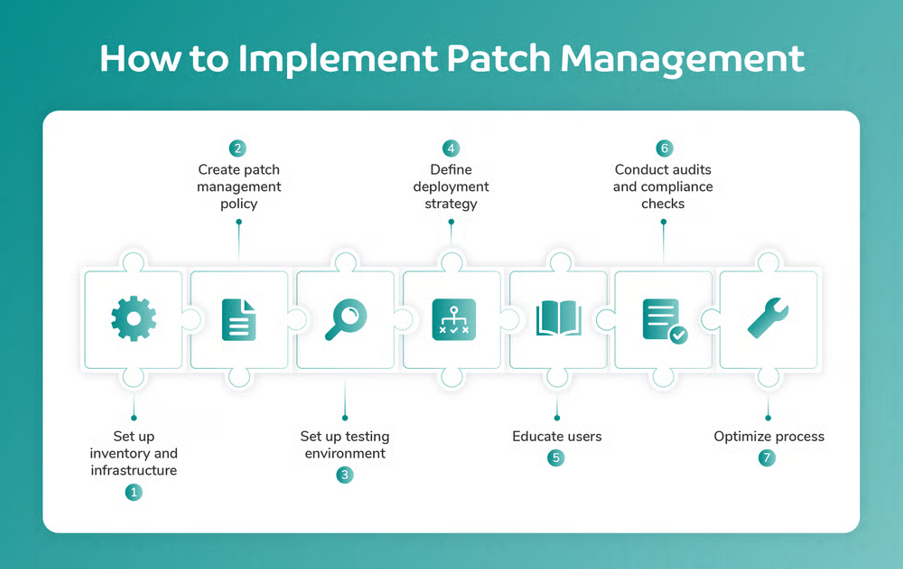
An effective patch management process typically follows five core stages.
Organizations begin by maintaining a complete inventory of hardware, operating systems, and applications. Vulnerability feeds, vendor advisories, and periodic assessments help identify systems that require patching.
Not every patch carries the same risk or urgency. IT teams assess patch severity, relevance to their environment, compatibility, and potential operational impact before deployment.
Testing patches in a controlled, non-production environment helps identify compatibility issues, performance impacts, or unexpected failures. Testing is especially important for mission-critical systems.
Patches are deployed according to defined schedules, often during maintenance windows to minimize disruption. Deployment strategies may vary based on asset criticality and risk tolerance.
After deployment, teams verify successful installation and monitor systems for issues. Documentation and reporting ensure accountability and support audits or compliance reviews.
Tools and Technologies for Patch Management
As IT environments scale, manual patching becomes impractical. Organizations increasingly rely on specialized tools to streamline patch management.
Patch management platforms centralize asset visibility, patch inventories, deployment schedules, and compliance reporting. They help IT teams manage patching consistently across diverse environments.
Automation enables continuous scanning, policy-based approvals, scheduled deployments, and real-time status tracking. Automated patching improves speed, accuracy, and consistency while reducing operational overhead.
Manual patching offers granular control but is time-consuming and prone to delays or errors. Automated patching scales more effectively, particularly for large or distributed environments, while still allowing approval workflows and exceptions when needed.
Challenges and Risks in Patch Management
Despite its importance, patch management presents several challenges.
Patches may conflict with existing configurations, legacy applications, or custom integrations, potentially causing system instability.
Limited IT resources can delay patch testing and deployment, especially when multiple critical updates are released simultaneously.
Balancing Security and Availability
Applying patches too aggressively may lead to downtime, while delaying patches increases security risk. Striking the right balance is essential.
Software that has reached end-of-life no longer receives vendor patches, increasing long-term risk and compliance exposure.
Patch Management Best Practices
Organizations can strengthen their patch management strategy by adopting proven best practices.
Define a Patch Management Policy
A formal policy outlines roles, responsibilities, patching frequency, testing requirements, approval workflows, and rollback procedures.
Prioritize Risk-Based Patching
Not all systems carry the same risk. Prioritizing patches based on asset criticality, vulnerability severity, and business impact ensures resources are used effectively.
Maintain Regular Testing Cycles
Consistent testing reduces deployment failures and improves confidence when rolling out patches to production systems.
Clear communication about patch schedules, expected impacts, and user responsibilities helps minimize disruptions and ensures smoother execution.
Patch Management with CyberSIO tbPatchManager
While patch management principles remain universal, modern enterprises often benefit from platforms that integrate patching with broader security and IT operations.
CyberSIO tbPatchManager is designed to support structured patch management by providing centralized visibility into assets, automated patch scheduling, and detailed audit reporting. It aligns patch management with vulnerability intelligence and operational workflows, helping organizations maintain secure and compliant systems across diverse environments.
Rather than replacing best practices, tbPatchManager supports them by simplifying execution, improving visibility, and reducing manual effort across enterprise patching processes.
